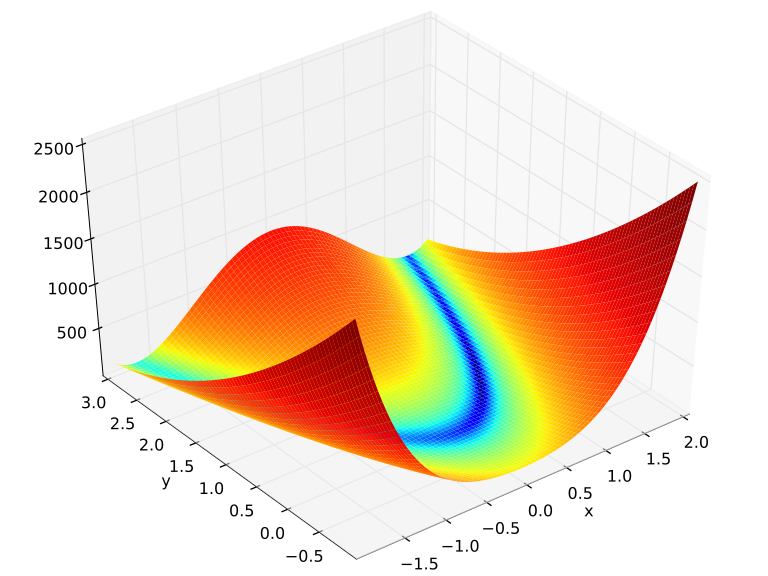
File:Rosenbrock function.svg
跳转到导航
跳转到搜索
此SVG文件的PNG预览的大小:720 × 540像素。 其他分辨率:320 × 240像素 | 640 × 480像素 | 1,024 × 768像素 | 1,280 × 960像素 | 2,560 × 1,920像素。
原始文件 (SVG文件,尺寸为720 × 540像素,文件大小:2.28 MB)
摘要
| 描述 |
English: Rosenbrock function over . The Python code needs at least Matplotlib v0.99. The MATLAB/Octave code was tested with GNU Octave 4.2.2 and MATLAB R2016a.
Español: Funció de Rosenbrock definida sobre . |
| 日期 | |
| 来源 | 自己的作品 |
| 作者 | Morn the Gorn |
| Python source | click to expand
from mpl_toolkits.mplot3d import Axes3D
from matplotlib.colors import LogNorm
import matplotlib.pyplot as plt
import numpy as np

fig = plt.figure()
ax = Axes3D(fig, azim=-128, elev=43)
s = .05
X = np.arange(-2, 2.+s, s)
Y = np.arange(-1, 3.+s, s)
X, Y = np.meshgrid(X, Y)
Z = (1.-X)**2 + 100.*(Y-X*X)**2
# ax.plot_surface(X, Y, Z, rstride=1, cstride=1, norm = LogNorm(),
#                 cmap="viridis")
# Without using `` linewidth=0, edgecolor='none' '', the code may produce a
# graph with wide black edges, which will make the surface look much darker
# than the one illustrated in the figure above.
ax.plot_surface(X, Y, Z, rstride=1, cstride=1, norm=LogNorm(),
                linewidth=0, edgecolor='none', cmap="viridis")

# Set the axis limits so that they are the same as in the figure above.
ax.set_xlim([-2, 2.0])
ax.set_ylim([-1, 3.0])
ax.set_zlim([0, 2500])

plt.xlabel("x")
plt.ylabel("y")
plt.savefig("Rosenbrock function.svg", bbox_inches="tight")

plt.show()
|
| MATLAB/Octave source | click to expand
clear all;
close all;
hfig = figure(1);

s = 0.05;
X = [-2 : s : 2+s];
Y = [-1 : s : 3+s];
[X, Y] = meshgrid(X, Y);
Z = (1-X).^2 + 100*(Y-X.^2).^2;

% Use log scale of Z for a batter usage of the color spectrum
minZ = min(Z(:));
maxZ = max(Z(:));
C = minZ + (maxZ-minZ).*log(1+Z-minZ)./log(1+maxZ-minZ);
% See
% http://stackoverflow.com/questions/5073865/how-to-color-surface-with-stronger-contrast
% for how to color a surface with a even stronger contrast.
% The method is as follows:
%C = Z;
%[~, index] = sort(C(:));
%C(index) = 1 : numel(index);

colormap(jet);
surf(X, Y, Z, C, 'EdgeColor', 'none', 'LineStyle', 'none');

axis([-2, 2, -1, 3, 0, 2500]);
xlabel('x', 'fontsize', 18);
ylabel('y', 'fontsize', 18);
zlabel('f', 'fontsize', 18);

% Note that the `-dsvg' option is only supported for Simulink systems
print(hfig, '-dsvg', 'rosenbrock');
% To produce eps and pdf, use the following code. Notice that `epstopdf' may not work on Windows.
print(hfig, '-depsc', 'rosenbrock');
system('epstopdf rosenbrock.eps');
|


许可协议

|
我,本作品著作权人,释出本作品至公有领域。这适用于全世界。 在一些国家这可能不合法;如果是这样的话,那么: 我无条件地授予任何人以任何目的使用本作品的权利,除非这些条件是法律规定所必需的。 |
文件历史
点击某个日期/时间查看对应时刻的文件。
| 日期/时间 | 缩略图 | 大小 | 用户 | 备注 | |
|---|---|---|---|---|---|
| 当前 | 2020年6月5日 (五) 02:19 | | 720 × 540(2.28 MB) | wikimediacommons>Zhangzk | The original colour looks much better (Reverted to version as of 11:52, 6 April 2010 (UTC)) |
文件用途
以下页面使用本文件:
